


The Logitech Driving Force Shifter software enhances your racing rig with precise control and immersive realism. Paired with Logitech G HUB, it allows you to customize your Driving Force Shifter for G923, G29, or G920 racing wheels, optimizing gear transitions and ensuring compatibility with the latest racing titles. With intuitive tools, you can fine-tune settings, update firmware, and integrate with supported games, making G HUB essential for every shifter user.
Downloading the Logitech Driving Force Shifter software elevates your racing experience. G HUB enables seamless integration with your racing wheel setup, ensuring smooth six-speed “H”-pattern shifts and push-down reverse functionality. It’s user-friendly, reliable, and a must-have for maximizing the shifter’s performance on PC and console platforms.
Enhance Your Racing with Logitech Driving Force Shifter Software
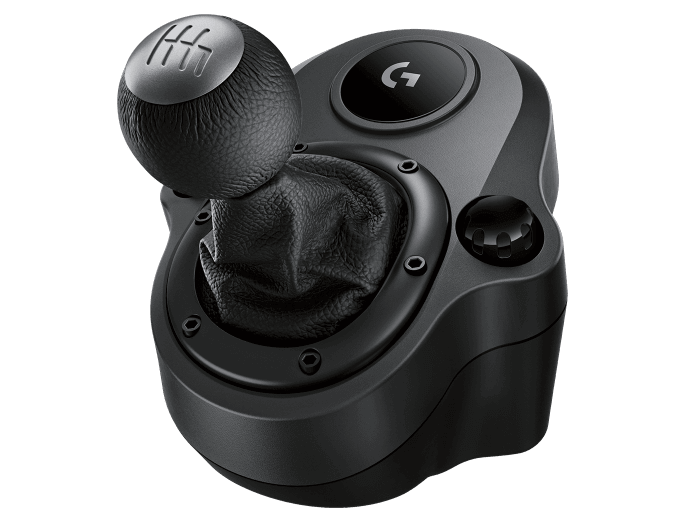
The Logitech Driving Force Shifter is a high-performance accessory designed for the G923, G29 (PlayStation/PC), and G920 (Xbox/PC) racing wheels, delivering an authentic racing experience. Crafted with a solid steel gear shaft and hand-stitched leather knob and boot, it offers durability and a premium feel. The six-speed “H”-pattern shifter with push-down reverse ensures fluid, accurate gear changes, while durable built-in clamps and bolt points secure it to your racing rig, minimizing wobble during aggressive maneuvers.
The G HUB software lets you customize your shifter experience. Adjust settings for supported racing titles, update firmware for compatibility, and ensure seamless integration with your G923, G29, or G920 wheel. The shifter connects via a DB9 (female) port to the racing wheel and supports platforms including Windows 10/11, Xbox Series X|S, Xbox One, PlayStation 5, and PlayStation 4, provided games support Logitech’s force feedback racing wheels.
Logitech Driving Force Shifter Software Specifications
Logitech G HUB is a powerful platform for configuring your Driving Force Shifter. It supports firmware updates, game-specific settings, and integration with racing titles that recognize Logitech’s shifter. System requirements include Windows 7 or later (64-bit) or macOS 10.11 or later. The shifter is not compatible with PlayStation 3 and requires a compatible Logitech racing wheel (G923, G29, or G920; G Pro Racing Wheel needs a Logitech G Racing Adapter).
Support
- Brand: Logitech
- Categories: Logitech G Driving Accessories
- Connectivity Technology: Wired (DB9 to racing wheel)
- Compatibility: G923, G29, G920 Racing Wheels
- Connector Type: DB9 (female)
- Type: Racing Shifter
- Score: 🏆🏆🏆🏆🏆
Download Logitech Driving Force Shifter Software:
Logitech G HUB software, available for Windows and Mac, ensures your Driving Force Shifter performs optimally with G923, G29, or G920 racing wheels. Update firmware, adjust settings for racing titles, and maintain compatibility with new games through regular updates.
Setting Up Your Logitech Driving Force Shifter with G HUB
To get started with your Driving Force Shifter, you’ll need Logitech G HUB to ensure compatibility and optimal performance:
- Ensure your G923, G29, or G920 racing wheel is connected to your PC or console.
- Download Logitech G HUB
- Install G HUB and launch the software.
- Connect the shifter to your racing wheel via the DB9 (female) port.
- G HUB will detect the shifter; follow prompts to install any necessary firmware updates.
- Verify game compatibility by checking Logitech’s list of supported titles
Your shifter is now ready for precise gear changes in your favorite racing games.
Checking for Firmware Updates for Logitech Driving Force Shifter
Keeping your shifter’s firmware up to date ensures smooth performance and game compatibility:
- Download the latest G HUB software.
- Open G HUB and connect your racing wheel with the shifter attached via the DB9 port.
Navigate to the “Settings” or “Gear” tab in G HUB to check for firmware updates. - If an update is available, follow the on-screen instructions to install it.
- If detection issues occur, reconnect the shifter, restart G HUB, or try a different USB port on your PC.
- After updating, test the shifter in a supported game to confirm functionality.
Resolving Software Issues for Logitech Driving Force Shifter
If you encounter issues with G HUB or shifter recognition, try resetting the software:
- Disconnect the shifter and racing wheel from your PC.
- On Windows, go to Control Panel > Programs > Uninstall a Program and remove G HUB. On Mac, drag G HUB to the Trash.
- Restart your computer to clear residual files.
- Reinstall the latest G HUB from .
- Reconnect your racing wheel and shifter, then launch G HUB to re-detect the device.
? Frequently Asked Questions
How to update Logitech Driving Force Shifter software?
Download the latest Logitech G HUB software from Logitech’s website. Connect your shifter via your G923, G29, or G920 racing wheel, open G HUB, and follow prompts to update firmware and settings.
How to uninstall Logitech Driving Force Shifter software?
Uninstall via Control Panel > Programs (Windows) or drag G HUB to the Trash (Mac). For thorough removal, use a third-party uninstaller. Reinstall from Logitech’s website.
Where to download Logitech Driving Force Shifter software?
Download Logitech G HUB from https://www.logitechg.com/en-us/innovation/g-hub.html. Select your operating system and follow the installation prompts.

 (1 votes, average: 1.00 out of 5)
 Loading...
