


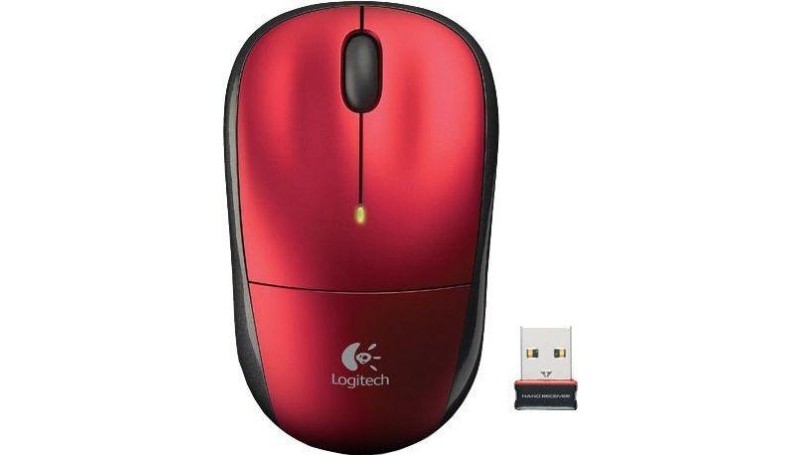
The Logitech M215 Wireless Mouse is a budget-friendly option for those seeking a simple and reliable wireless solution. Its compact design makes it easy to slip into a bag for on-the-go use, while the ambidextrous shape caters to both left-handed and right-handed users. Featuring standard left and right click buttons with a scroll wheel, it offers intuitive navigation for everyday tasks like browsing the web or working on documents. The M215 boasts a long battery life, lasting for months on a single AA battery, minimizing interruptions and maximizing convenience. While lacking the advanced features of more expensive mice, the Logitech M215 Wireless Mouse prioritizes portability, ease of use, and affordability, making it a solid choice for everyday computer use.
Overall, the Logitech M215 Wireless Mouse is a solid choice for users seeking a simple and affordable wireless solution. Its compact design, ambidextrous shape, long battery life, and plug-and-play functionality make it a convenient and practical option for everyday computer use, whether at home, work, or on the go.
Logitech M215 Wireless Mouse Specifications
Simple and On-the-Go: Unveiling the Logitech M215 Wireless Mouse Specs
The Logitech M215 Wireless Mouse prioritizes portability, affordability, and ease of use for everyday computer tasks. Here’s a breakdown of its key specifications:
- Design: Compact and lightweight design for easy portability, fitting comfortably in most laptop bags or backpacks.
- Ambidextrous Shape: Symmetrical design suitable for both left-handed and right-handed users.
- Buttons: Standard two-button layout (left click, right click) with a scroll wheel for intuitive navigation.
- Wireless Connection: Uses a 2.4 GHz wireless connection with a range of up to 10 meters (may vary depending on environment) through a tiny USB receiver.
- Plug-and-Play Simplicity: The USB receiver can be left plugged into your computer for constant connection, or easily stored within the mouse itself for travel.
- AA Battery Powered: Uses a single AA battery (often included) for long battery life, lasting for up to several months (may vary based on usage).
Benefits of Logitech M215 Wireless Mouse Driver Update
- Improved Performance and Responsiveness: Driver updates can refine tracking algorithms, potentially leading to smoother cursor movement and more precise clicks. This translates to a more responsive user experience, especially when navigating menus, selecting text, or dragging and dropping files.
- Enhanced Battery Optimization: Certain driver updates might include battery optimization features. This can potentially extend your M215’s battery life, ensuring it lasts longer between battery replacements.
- Compatibility and Security Enhancements: Regular driver updates address potential compatibility issues with your operating system, productivity applications, and other software. They can also incorporate security fixes to safeguard your system from potential vulnerabilities.
Downloading Logitech M215 Software
At our website, we are committed to providing you with the best possible experience when it comes to your Logitech devices. That’s why we offer a wide range of free driver and software for Windows 10 and Windows 11, and Mac OS to ensure that your Logitech devices run smoothly and function optimally.
Whether you’re using a Logitech gaming keyboard, webcam, speaker, or any other Logitech device, we have the drivers and software you need to get the most out of your device. Our selection includes everything from basic drivers to advanced software that allows you to customize your Logitech devices to your liking.
Downloading drivers and software from our website is incredibly easy and convenient. Simply browse through our selection and choose the driver or software that’s right for your device and operating system. Then, click the download button and wait for it to be downloaded to your computer or laptop.
One of the benefits of downloading drivers and software from our website is that they are completely free. You don’t have to worry about any hidden fees or charges – all of our drivers and software are available for download at no cost to you.
Boost Your Device With Logitech M215 software
Keeping your drivers updated and following these optimization tips ensures your Logitech M215 continues to deliver a smooth and reliable user experience. While basic functionality is available upon connection, periodic driver updates can enhance performance and compatibility. Remember, the M215 is designed for simplicity – its core strength lies in its reliable functionality and long battery life. By following these tips, you can ensure your M215 remains a dependable companion for all your computing needs. Download the latest drivers from this page, explore basic operating system settings for customization options, and enjoy the simple efficiency of your Logitech M215.
Unlike some other services that share downloadable software, we don’t ask visitors to share personal data, create accounts, and somehow verify them or even pay for the download. Our service is 100% free and safe. Our specialists check all the files to ensure there are no dangerous files in there. Moreover, if there’s something you don’t understand, clarify it by contacting customer support representatives. They will answer all your questions and give you all the information about the drivers for the Logitech.
? Logitech M215 Wireless Mouse Driver and Software — FAQ
Where can I find the correct driver for my Logitech M215 Wireless Mouse?
You can download the official drivers and software for your Logitech M215 Wireless Mouse directly from our website: https://plugdriver.com/. We host the latest versions to ensure compatibility and optimal performance.
How do I install or update the driver for my Logitech M215 Wireless Mouse?
To install or update your driver, first download the appropriate driver package for your operating system from https://plugdriver.com/. Once downloaded, double-click the executable file and follow the on-screen instructions. For updates, the installer will typically detect your existing driver and prompt you to upgrade.
I’m having trouble getting my Logitech M215 Wireless Mouse to work after installing the driver. What should I do?
If you’re experiencing issues, first ensure you’ve downloaded the correct driver for your operating system from https://plugdriver.com/. Try restarting your computer. If the problem persists, you can try uninstalling the current driver through your operating system’s device manager, then reinstalling the driver you downloaded from our website. Also, check that the mouse batteries are charged and the USB receiver is securely plugged in.
Tip: Click a question to expand the answer.

 (1 votes, average: 1.00 out of 5)
 Loading...
